
In authoring documents at the college, follow the style guidelines below. (Adapted in part from earlier work of Professor Dana Lee Ling and Jonathan Gourlay).
1. Writing out Academic degrees
When degrees are spelled out they should be presented in lowercase. Example: bachelor’s degree, master’s degree, doctoral degree or doctorate. If degrees are to be abbreviated do not separate the letter with periods (AS, AA, BA, BEd, Ed D, MA, and PhD).
Examples:
- He earned an associate’s degree in Agriculture.
- The student received her associate of science degree in Marine Science.
- She earned an AS degree in CIS.
- She was accepted into the Associate of Arts in Liberal Arts program. (capitalize the official names of programs)
2. Capitalizing Board of Regents
Board of Regents is capitalized when referring to college’s governing body. Individual members are regents. Use BOR or board (lowercase) for second reference. Capitalize regent only as part of the board’s formal name or when used before a name.
Examples:
- We met with Regent Mary Figir.
- Churchill Edward is a regent.
3. Using College and Campus Names
When referring to the college as a whole, spell out the name as the College of Micronesia-FSM or abbreviate as COM-FSM. When using the abbreviated name of the college, do not add “the” before COM-FSM.
Example:
- The College of Micronesia-FSM is a college
- COM-FSM is a college.
When specifically referring to COM-FSM by saying “the college,” do not capitalize “college.”
Examples:
- The college’s accreditation was reaffirmed.
- The college is accredited by ACCJC.
In referring to specific campuses of the college they are officially:
- College of Micronesia-FSM Chuuk Campus
- College of Micronesia-FSM Kosrae Campus
- College of Micronesia-FSM Pohnpei Campus
- College of Micronesia-FSM National Campus
4. Following a Citation Style
Follow The Modern Language Association (MLA) Handbook, and the American Psychological Association (APA) Manual when citing outside material to be used in published works of the college. The use of other style manuals (for example, the Council of Science Editors (CSE) Citation Style) is allowed when they are required by the publication or organization to which the work is being submitted.
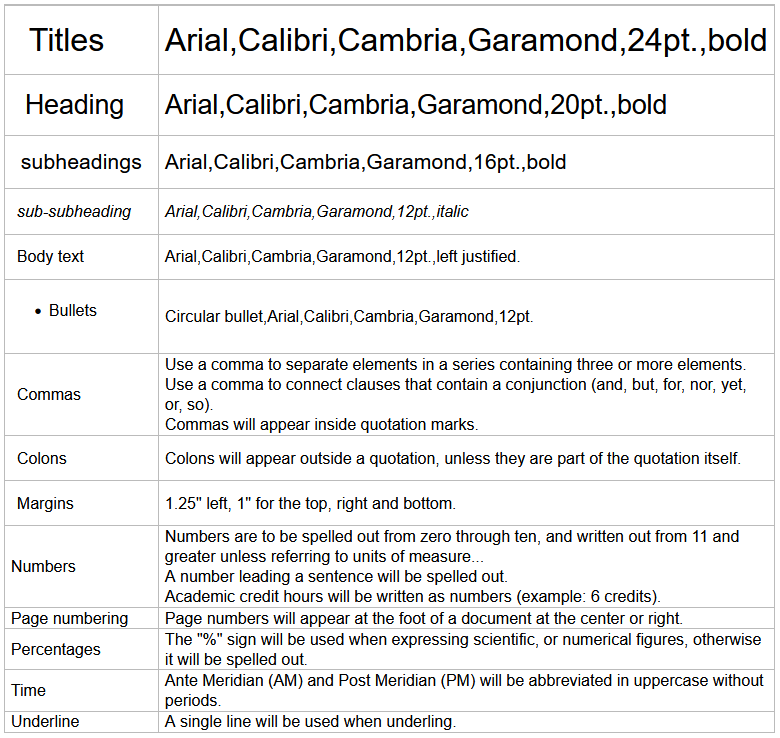
5. Formatting and Style
6. Using the Terms Classes and Courses
In referring to classes and courses use lowercase, unless specifically referring to the proper name of a course.
Example:
- I had a class in fundamentals of management.
- I’m taking BU 260/1 Fundamentals of Management.
7. Writing out Dates
| Do not use a comma in writing out dates when only the month and year appear. | Example:
|
| Do use a comma in writing out dates that include the month, date and year and to separate the date from the next element that follows it in a sentence. | Example:
|
8. Using the Terms Department, Division or Office
The terms department, divison, and office will be used to identify the subdivisions within the college. Department will be reserved for the administrative componets of the college (AS, EMSS, IA, and IEQA). The administrative side of the organization will be divided into offices, whereas the academic elements will be divisions. The exception to this would be the college’s other campuses that fall under the purview of Instructional Affairs. They are campuses and not a division or an office, whilst housing divisions and offices.
Example of Departments:
- Department for Adminstrative Services
- Department for Enrollment Management and Student Services
- Department for Instructional Affairs
- Department for Institutional Effectiveness and Quality Assurance
Note: The naming of departments will be “for” and not “of” the respective unit.
The use of division and office will be lowercase unless identified in the formal name of a division or office.
Example:
- The Division of Languages and Literature submitted its report.
- The divisions submitted their reports.
- The Office of the President requested a meeting.
- The president’s office is sponsoring lunch.
Use lowercase of the unofficial names of divisions or offices unless the division or office itself contains a proper name (for example, English division faculty):
Example:
- Students in the math division did very well in the spring semester. (The proper name would be Math and Sciences Division)
- Joey’s office wants the report today.
9. Using the term Email
When referring to electronic mail, it will be spelled in lowercase as “email” and without a hyphen
Example:
- The email was received by the department.
- I wrote an email today.
10. Using the Terms Webpage/Website
When referring to an online document found on the World Wide Web, it is to be called a “webpage”. A collection of webpages found on a single server hosting the webpages will be called a “website”.
Example:
- The webpage contained the contact information I needed.
- The college’s website has a webpage for each department.
11. Using the terms online/offline
When referring to the internet use the terms “online” and “offline” respectively without a hyphen.
Example:
- The document was found online and downloaded for offline use.
12. Writing program Names
Capitalize program names when using their full titles.
Example:
- The Bachelor of Education in Elementary Education Program graduated 20 students this semester.
- The bachelor’s program is looking forward to gradating more students.
13. Referring to Students
Refer to students of the college as “COM-FSM students” or “the college’s students”.
Example:
- COM-FSM students are eligible for Financial Aid.
- The college’s students pay tech fee.
14. Using “The” before Acronyms
Do not add a “the” before an acronym.
| YES | NO |
|
|
15. Writing out Tiles
A person’s title is capitalized only when used before the name. When using a capitalized title immediately before the name, try to keep it short. Do not capitalize an occupational designation, only a true title. Write titles in lowercase when referring to a person’s official capacity without their proper name.
- It was announced by President Daisy.
- The president shared the announcement on our accreditation status.
- The vice president of administrative services will report on that issue.
- I sat in a lecture by Professor Dana Lee Ling.
- The policy was explained by Director Gordon Segal.
- Gordon Segal, a director at the college, issued the memorandum.
- The president of the College of Micronesia-FSM will be the guest speaker at the conference.
16. Using COM-FSM Abbreviations and Acronyms
Any organization develops special ways of shortening its terms or titles, and COM-FSM is no exception. Table 3 below lists the accepted ways to shorten terms or titles in COM-FSM publications.
It is advised that in its first reference, the full name being referred to is spelled out followed by the acronym in parenthesis. The acronym may be used alone at second reference or beyond.
Example:
Welcome to the [First reference] College of Micronesia-FSM (COM-FSM). Your time at [Second reference] COM-FSM is important to us.Table 3. COM-FSM Abbreviations and Acronyms
| Abbreviation | Description |
Locations or | BLDG | Building |
| COM-FSM | College of Micronesia-FSM |
| FSM-FMI | FSM-Fisheries and Maritime Institute |
| CC | Chuuk Campus |
| KC | Kosrae Campus |
| NC | National Campus |
| PC | Pohnpei Campus |
| YC | Yap Campus |
Position Titles | AALO | assistant ALO |
| ALO | accreditation liaison officer |
| CCD | Chuuk Campus Dean |
| COS | chief of staff |
| DA | dean of assessment |
| DAP | dean of academic programs |
| DCRE | director of Cooperative research and extension |
| DIR | director |
| DoIE | director of institutional effectiveness |
| DPPM | director of procurement and property management |
| DSL | director of student life |
| IC | instructional coordinator |
| KCD | Kosrae Campus Dean |
| PCD | Pohnpei Campus Director |
| SC-CRE FO | State Coordinator Cooperative Research and Extension Fiscal Officer |
| SSC | student services coordinator |
| VPIA | vice president for instructional affairs |
| VPAS | vice president for administrative services |
| VPEMSS | vice president for enrollment management and student service |
| VPIEQA | vice president for institutional effectiveness and quality assurance |
| YCD | Yap Campus Dean |
Divisions, Offices, or units | AES | Agricultural Experiment Station |
| AS | Administrative Services |
| BAD | Business Administration Division |
| BO | Business Office |
| BOR | Board of Regents |
| CC | Curriculum Committee |
| CES | Cooperative Extension Services |
| ChAWG | Chuuk Assessment Working Group |
| CRE | Cooperative Research and Extension |
| CS | Counseling Services |
| DHS | Division of Health Sciences |
| DNSM | Division of Natural Sciences and Mathematics |
| EC | Executive Committee |
| ED | Education Division |
| ETSP | Educational Talent Search Program |
| FAO | Financial Aid Office |
| FC | Finance Committee |
| FCE | Facilities and Campus Environment |
| FSS | Faculty/Staff Senate |
| HRC | Human Resources Committee |
| HS | Health Services |
| IA | Instructional Affairs |
| IAEA | Institutional Advancement & External Affairs |
| IEO | Institutional Effectiveness Office |
| ICT | Information, Communications, and Technology Committee |
| ITO | Information Technology Office |
| Lang Lit | Languages and Literature Division |
| LRC | Learning Resource Center |
| MITC | Media Information and Technology Center |
| MTeam | Management Team |
| OARR | Office of Admissions, Records and Retention |
| OA | Office of Assessment |
| OIE | Office of Institutional Effectiveness |
| PPMO | Procurement and Property Management Office |
| PCC | Peer Counseling Center |
| PRC | Planning and Resources Committee |
| RAR | Recruitment Admissions and Retention Committee |
| RH | Resident Halls |
| RI | Resident Instruction |
| SBA | Student Body Association |
| Soc Sci | Social Sciences Division |
| SR | Sports and Recreation |
| UB | Upward Bound Program |
|
| Campus Security and Maintenance |
Degree and Certificate Programs | HTM | Hotel and Tourism Management |
| AFT | Agriculture and Food Technology |
|
|
|
| CTE | Career Technical Education |
| ACE | Achieving College Excellence |
Plans and Documents | IEMP | Integrated Educational Master Plan |
| SP | Strategic Plan |
| FMP | Facilities Master Plan |
| ERP | Emergency Response Plan |
| TracDat |
17. Document and File Naming Conventions
As documents flow back and forth (or even outside) the institution, it becomes important to pay attention to how you name and save different versions of a document.
Naming Documents
Every document you prepare as an official COM-FSM publication should have the college seal, a clear and relevant title, the author’s (or authors’) name, and the date of publication on the cover page.
Exceptions will be made where external documents are being prepared and require a separate title page.
Example:
Naming Files
Every file you prepare and save should have a filename that clearly identifies the subject, the author and the date the file was saved. Doing so allows for recognizing the most recent version of a document, but also makes it easier to recognize when you share it with a co-worker or intended reader.
Example:
- com-fsm-pubstandards-101313-JV.doc
- com-fsm-convocationstage-0913-ST.jpg
- com-fsm_mid-term_draft2_1-13-12-ldm.pdf
- combined-report-draft4-10-27-2013.doc
- com-fsm chuuk campus all-campus meeting minute-11-06-13 pdf
For the purpose of program reviews and assessment, the file-naming scheme described below should be adhered to.
| Academic Programs | |
|---|---|
AY2009_10_IANCE3_W1 In words: Academic Year 2009/10, Department of Instructional Affairs, National Campus, Education 3rd Year Program, Worksheet One Improvement Plan Note:use underscore not dash | Academic Year: ex. AY2009_10, AY2010_11 Department: 2 letters, IA – Instructional Affairs Campus: 2 letters
Program: 2 letters to be set by the appropriate Vice President Worksheet: W1 – Worksheet 1 Improvement Plan, W2 – Worksheet 2 Assessment Plan, W3 – Worksheet 3 Program Assessment, PR – Program Review |
| Nonacademic Programs | |
|---|---|
FY2012_QANCIT_W2 In words: Fiscal Year 2012, Department of Institutional Effectiveness and Quality Assurance, National Campus, Information Technology, Worksheet 2 Assessment Plan Note:use underscore not dash | Academic Year: ex. AY2009_10, AY2010_11 Department: 2 letters, IA – Instructional Affairs
Campus: 2 letters
Program: 2 letters to be set by the appropriate Vice President Worksheet: W1 – Worksheet 1 Improvement Plan, W2 – Worksheet 2 Assessment Plan, PR – Program Review |
18. identifying Common Errors in Usage
The following examples represent some of the most common usage errors found in college publications.
Table 4. Some Common Usage Errors in COM-FSM Publications
| Usage Error | Sample Correction |
| National campus | National Campus |
| We are the COM-FSM | We are COM-FSM |
| The President will attend | The president will attend |
| The Regents were invited | The regents were invited |
19. Avoiding Plagiarism
With respect to the college’s policy on Academic Honesty, all college publications will follow that standard. All works will be cited where necessary, and plagiarism in any form will not be tolerated.